
Liquor store and bottle shop setup guide
This guide sets up a liquor store, wine shop or bottle shop on SmartPOS Hub. You finish with bottles and cases, beer packs, age checks at the till and online, trade and wine club prices, case discounts, lot and date tracking, and a daily routine that keeps the cash and stock right.
Who this guide is for
Section titled “Who this guide is for”- Liquor stores and off-licences selling spirits, wine, beer and mixers.
- Wine shops with cases, a wine club and tastings.
- Beer stores with singles, packs and cases.
What you will set up
Section titled “What you will set up”- Settings and locations: stores, expiry and lots, sub-units and modules.
- Bottles, cases and packs: units, sub-units and beer pack variations.
- Age-restricted sales: ID checks at the till, online and in Scan & Go.
- Trade prices, clubs and deposits: price groups, discounts and container deposits.
- Purchases, lots and stock: distributor deliveries, lots, dates and stock reports.
- Daily operations and the go-live checklist.
How the pieces fit together
Section titled “How the pieces fit together”| You want to… | Where it happens | Module or setting |
|---|---|---|
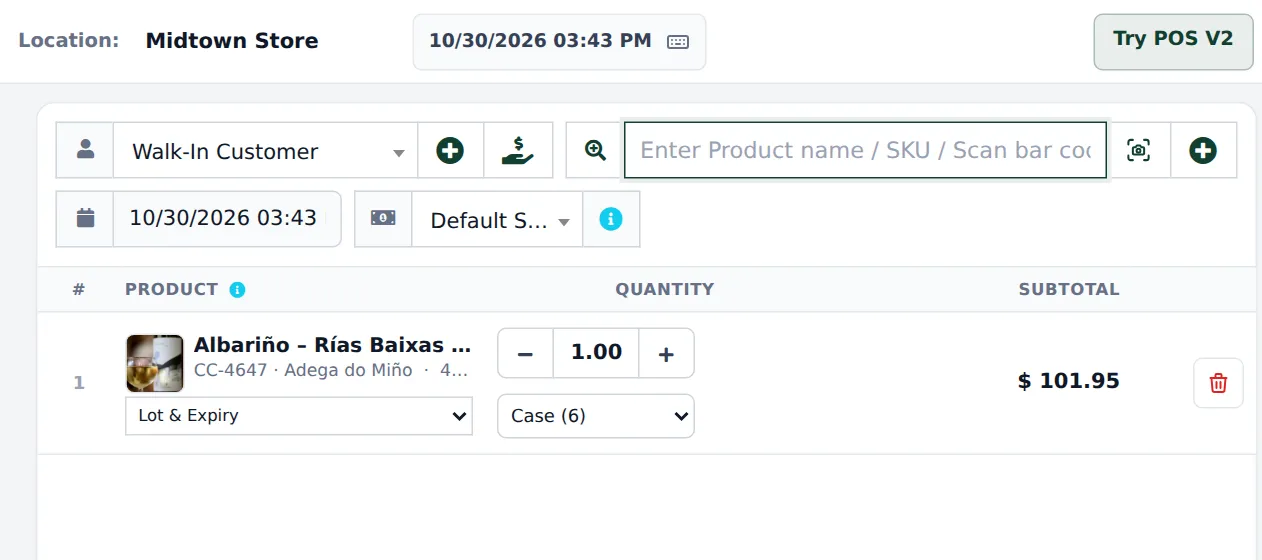
| Sell by the bottle or the case | Products › Units, product Related Sub Units | Enable Sub Units |
| Sell beer in 4-packs and cases | Variable product | Core |
| Check ID at the till | Products › Order options form Age-restricted sale | Order options & personalisation |
| Check age online | Product Online store tab › Age restricted | Website / Shopper app |
| Trade and club prices | Selling Price Group + Customer Groups | Core |
| Case discounts and offers | Sell › Discounts | Core |
| Lot numbers and dates | Purchase lines | Enable Lot number, Enable Product Expiry |
Related guides
Section titled “Related guides”Frequently asked questions
Can I sell wine by the bottle and by the case?
Yes. Use Bottle as the base unit and Case (6) and Case (12) as sub-units. The cashier picks Bottle or Case on the sale line and stock is counted in bottles.
How do I sell beer in 4-packs, 6-packs and cases?
Make the beer a variable product with one variation per pack (Single, 4-Pack, 12-Pack, Case (24)), each with its own price and barcode. Packs can be cheaper per can than singles.
Does the POS check the customer's age?
Not by itself. With the Order options module you attach a ready-made Age-restricted sale form to alcohol categories; the till then asks for the date of birth, refuses anyone under the minimum age and needs the cashier to confirm the photo ID was checked.
Do online orders and Scan & Go check age?
Yes, for products marked Age restricted on the product's Online store tab. The website asks customers to confirm their age, and Scan & Go carts with such items show a check-ID note to the cashier.
Can I charge a bottle or can deposit?
There is no built-in container deposit. Add a product such as Bottle deposit without stock and add it to the sale, or include the deposit in the shelf price.
Can restaurants and wine club members get their own prices?
Yes. Create selling price groups such as Trade and Wine Club and link them to customer groups. Members get their prices as soon as you pick them on the sale.
Can I track lot numbers and best-before dates?
Yes. Turn on Enable Product Expiry and Enable Lot number. Purchases record the lot and dates, and Reports › Lot Report and Stock Expiry Report show them.
Is there a ready-made liquor catalog?
No. The Product Library has Mart, Pharmacy and Electronics catalogs, with no wine and spirits catalog. Most bottle shops import their distributor's list with Products › Import Products.
Can I run case discounts and seasonal offers?
Yes. Sell › Discounts applies automatic discounts by brand, category or product, per location and date range.
Which plan do I need?
The POS, units, price groups, discounts and lots are in every plan. Order options, the website and the Shopper app depend on your plan. Settings › Package Subscription shows what is included.