
Pharmacy step 1: expiry, lot numbers and sub-units
A pharmacy needs three settings that most shops don’t: expiry dates, lot (batch) numbers and sub-units (tablet, strip, box). Turn them on before you import medicines or enter stock, so every unit you receive carries its batch and expiry.
Before you start
Section titled “Before you start”- You are the owner or an admin.
- Add each branch under Settings › Business Locations first; see Locations. Business name, currency and logo: Business settings.
Turn on product expiry
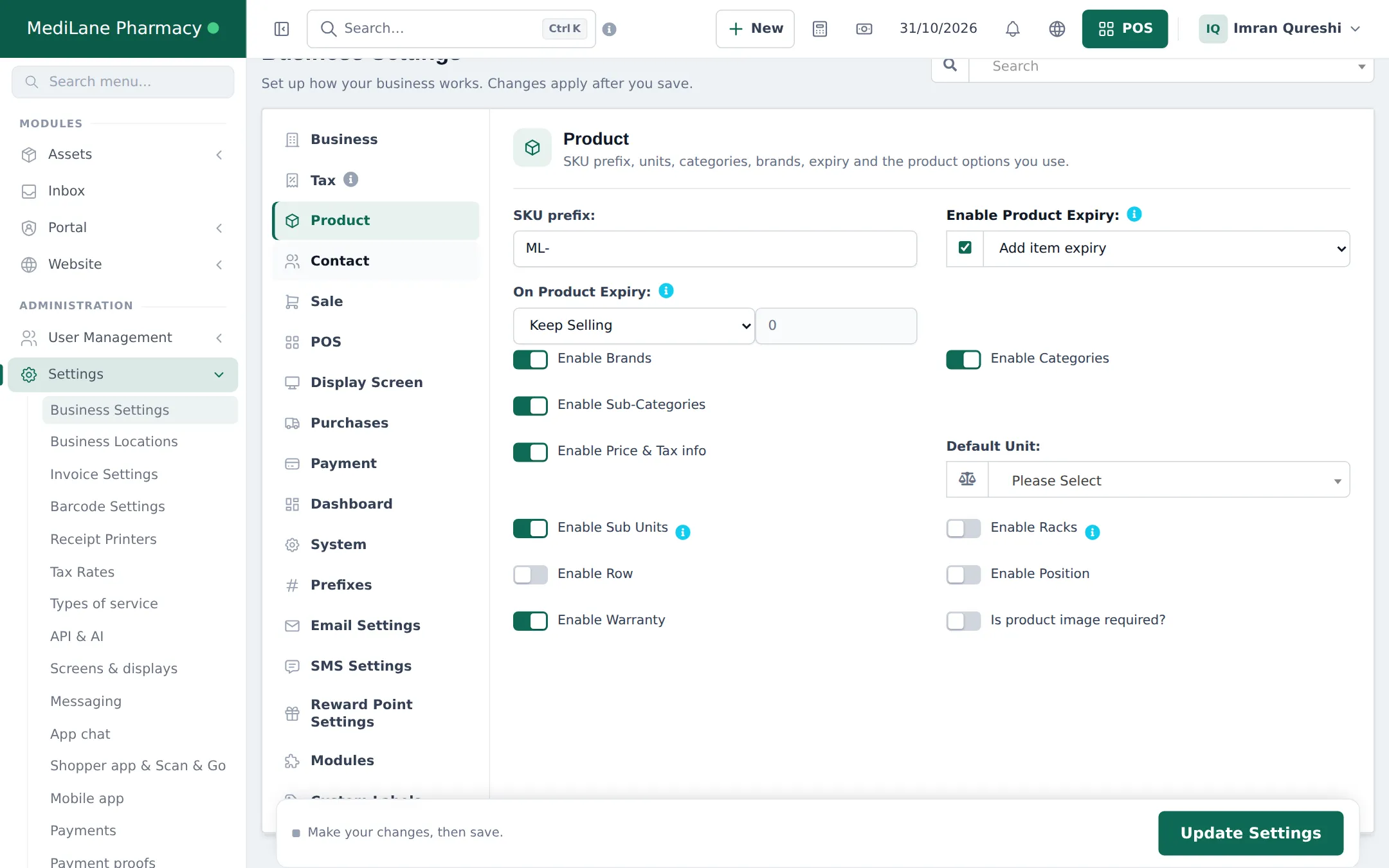
Section titled “Turn on product expiry”- Open Settings › Business Settings and click the Product tab.
- Tick Enable Product Expiry and choose Add item expiry (you enter the expiry date on each purchase) or Add manufacturing date & expiry period.
- Under On Product Expiry, choose Stop Selling n days before and enter the number of days, or Keep Selling.
- Switch on Enable Sub Units, Enable Brands, Enable Categories and Enable Sub-Categories.
- Optional: Enable Racks, Enable Row and Enable Position to record where each medicine sits on the shelves.
Turn on lot numbers
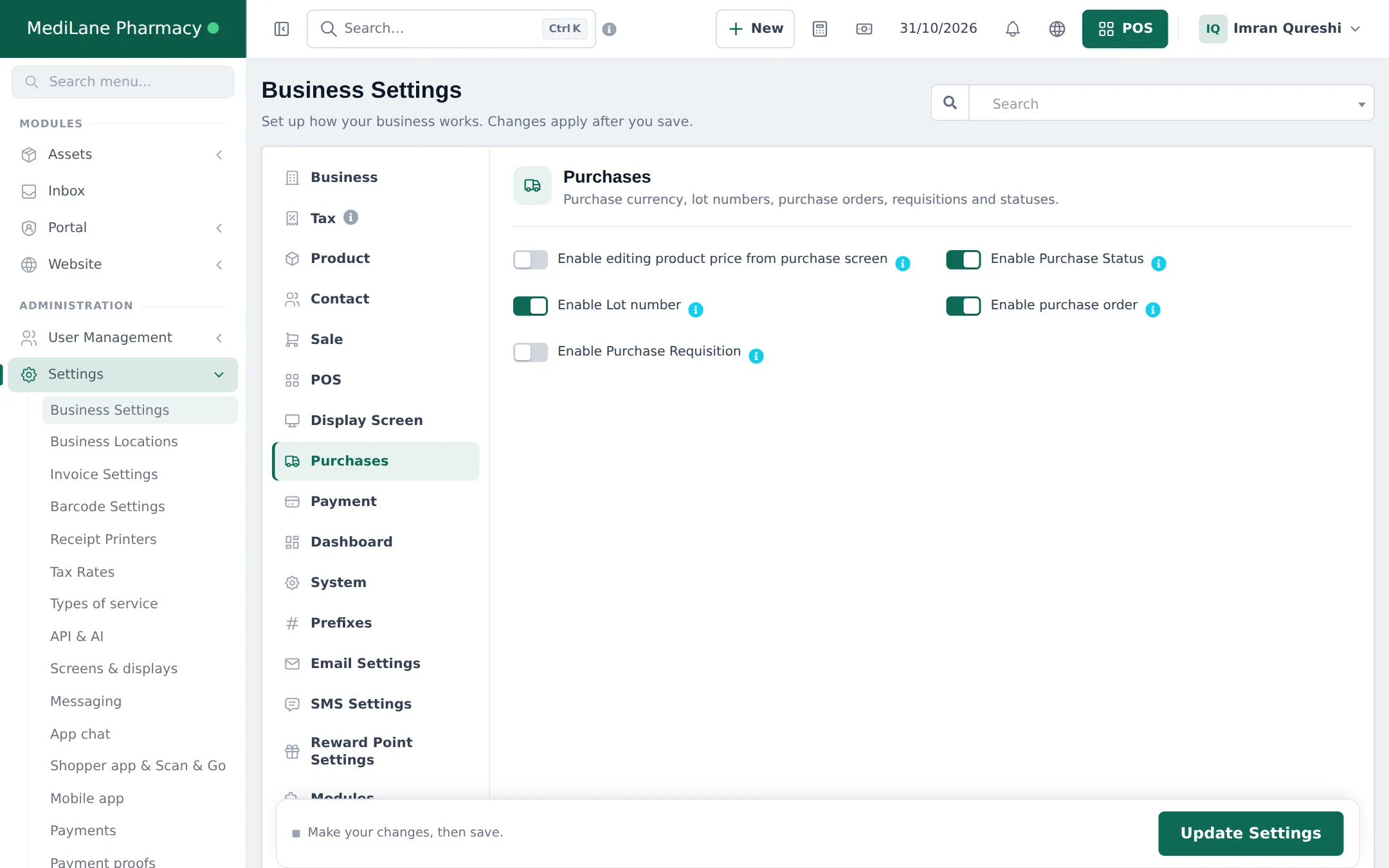
Section titled “Turn on lot numbers”- Click the Purchases tab.
- Switch on Enable Lot number.
- Optional: Enable purchase order if you order from distributors ahead of delivery.
- Click Update Settings at the bottom of the page.
Other settings for a pharmacy
Section titled “Other settings for a pharmacy”| Where | Setting | Suggestion |
|---|---|---|
| Business › Stock Accounting Method | FIFO | Older stock is sold first |
| Settings › Tax Rates | Your medicine tax rules | Many countries exempt medicines; check with your accountant |
| Settings › Invoice Settings / receipt layout | A layout that prints batch and expiry | See Receipts and invoice layouts and the Invoice designer |
| Settings › Business Settings › Modules | Product Library on | Needed for step 2, if your plan includes it |
Frequently asked questions
Should I choose Keep Selling or Stop Selling n days before?
Most pharmacies choose Stop Selling with a few days' margin, for example 30, so short-dated medicine is not sold to patients. Keep Selling only warns you through reports.
What is the difference between Add item expiry and Add manufacturing date & expiry period?
With Add item expiry you type the expiry date on each purchase line. With Add manufacturing date & expiry period you type the manufacturing date and SmartPOS Hub works out the expiry from the product's expiry period.
Do I need lot numbers if I have expiry dates?
It is strongly recommended. Lot numbers let you trace a batch for recalls and returns, and pick the exact batch at the till.
Can I switch these settings on after I have stock?
Yes, but stock received before has no lot or expiry. Turn them on before entering opening stock.
Do I need to switch on sub-units by hand?
The Product Library import switches Enable Sub Units on for you when it creates strip and box units. Turn it on yourself if you create medicines by hand.