
Convenience store step 5: age checks and extras
Convenience stores sell some things that need more than a scan: tobacco and alcohol need an ID check, coffee has choices, and top-ups need a phone number. The Order options & personalisation module adds a short form to those items at the till.
Before you start
Section titled “Before you start”- Order options & personalisation is on (Settings › Business Settings › Modules). A greyed card Not in your plan means your plan does not include it.
- Tobacco, vape and alcohol products are in their own categories.
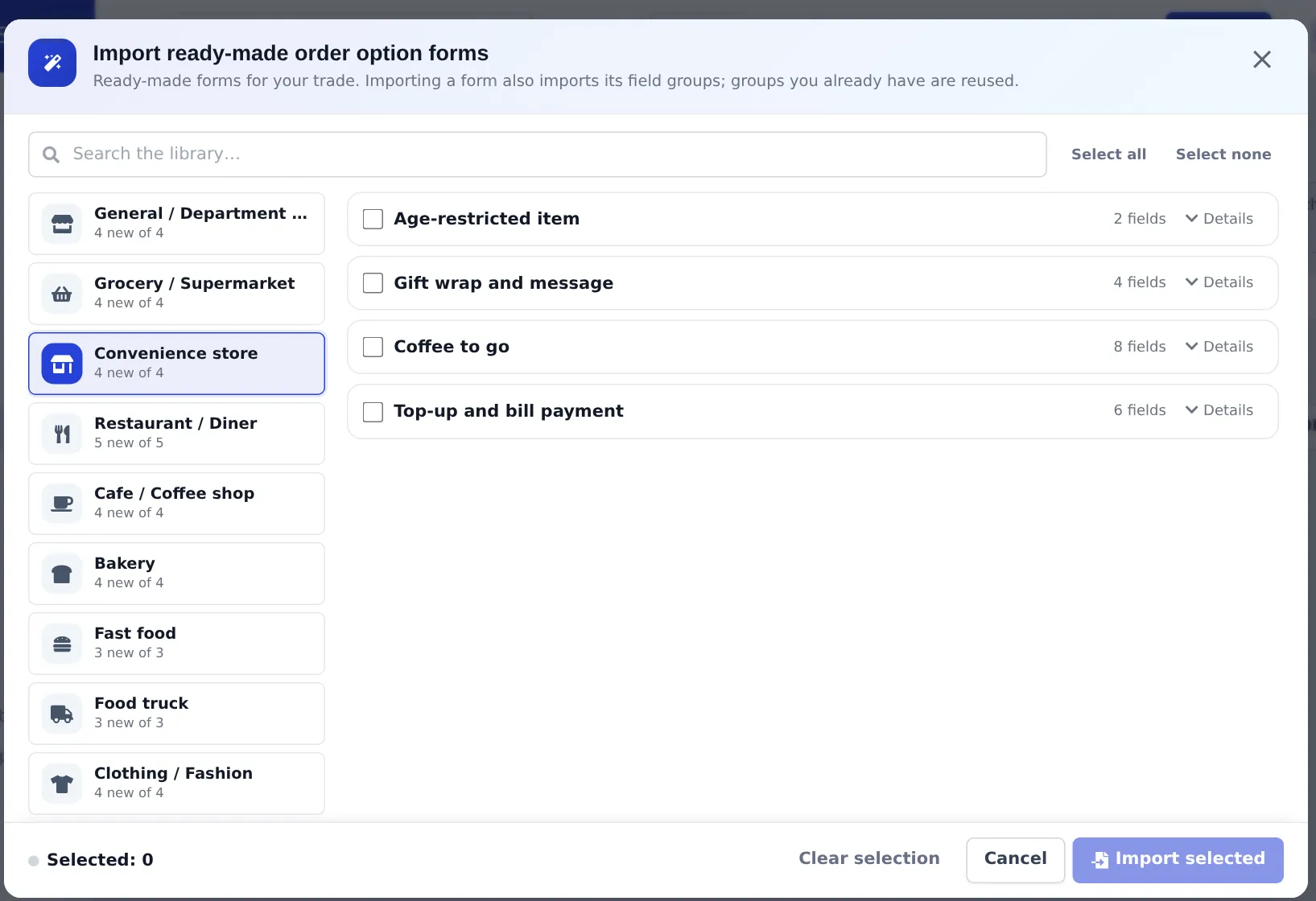
Import the convenience store forms
Section titled “Import the convenience store forms”- Open Products › Order options and click Import prebuilt.
- Choose Convenience store and tick the forms you need: Age-restricted item, Gift wrap and message, Coffee to go, Top-up and bill payment. Details shows each field.
- Click Import selected.
- Open Where they apply › Attach to products: Age-restricted item to Tobacco, Vapes and Beer & Wine; Coffee to go to the coffee category; Top-up and bill payment to your top-up products.
At the till
Section titled “At the till”- Age-restricted item: enter Date of birth and tick I have checked the customer’s photo ID. Under-age dates are rejected.
- Coffee to go: choose size, milk and extras; the add-on price updates.
- Top-up and bill payment: type the phone or account number; it prints on the receipt for the customer.
Also switch on Age restricted on the Online store tab of tobacco and alcohol products, so online orders and Scan & Go carts ask for age (bottle shop step 3 shows the screen).
What is not supported
Section titled “What is not supported”| Item | Status | What stores do |
|---|---|---|
| Fuel pumps | No integration | Keep the fuel controller separate; record shop sales only |
| Lottery | No terminal integration | Optional product without stock for totals |
| Top-up / bill payment providers | No direct connection | Product without stock + the form for the number |
Next: daily operations.
Frequently asked questions
How does the till check age?
Attach the Age-restricted item order options form to tobacco, vape and alcohol categories. When such an item is added, the cashier enters the date of birth (rejected if under the minimum age) and confirms the photo ID was checked.
Our legal age for tobacco is 21.
Import the field group Age check (21+) on the Field groups tab of Products › Order options and use it in the form instead of Age check (18+).
Can I sell mobile top-ups?
Record them as a product without stock and attach the Top-up and bill payment form to capture the phone or account number. The top-up itself is done on your provider's terminal or website.
Do you support lottery or fuel?
No lottery terminal or fuel pump integration exists. Some stores record lottery sales as a product without stock to keep totals; payouts are recorded as expenses or refunds following your accountant's advice.
Can customers order coffee with their name for pickup?
Yes. The Coffee to go form records cup size, milk, extras and the name to call out, and prints on the ticket.