
Car wash step 1: turn on Services and Bookings
A car wash sells two kinds of work: quick washes rung up at the pay station, and longer jobs (full service, detailing) that take a crew member’s time. The Services module handles the timed work and commission; Bookings gives you the calendar and the line of cars; the POS sells everything.
Add your sites
Section titled “Add your sites”- Open Settings › Business Locations. Edit the first location or click Add for each wash site.
- Enter the name customers know (for example Desert Gleam – Camelback), address and phone.
- Choose the invoice scheme and layout. Save.
Switch on the modules
Section titled “Switch on the modules”- Open Settings › Business Settings and go to the Modules tab.
- Turn on Services, Bookings and Service staff. Keep POS and Add Sale on.
- Optional: Gift cards to sell real gift cards, Customer display for a screen facing the driver, Website & online store for a website with the booking link.
- Click Update settings. The Services menu and Bookings appear in the sidebar.
Set hours and scheduling
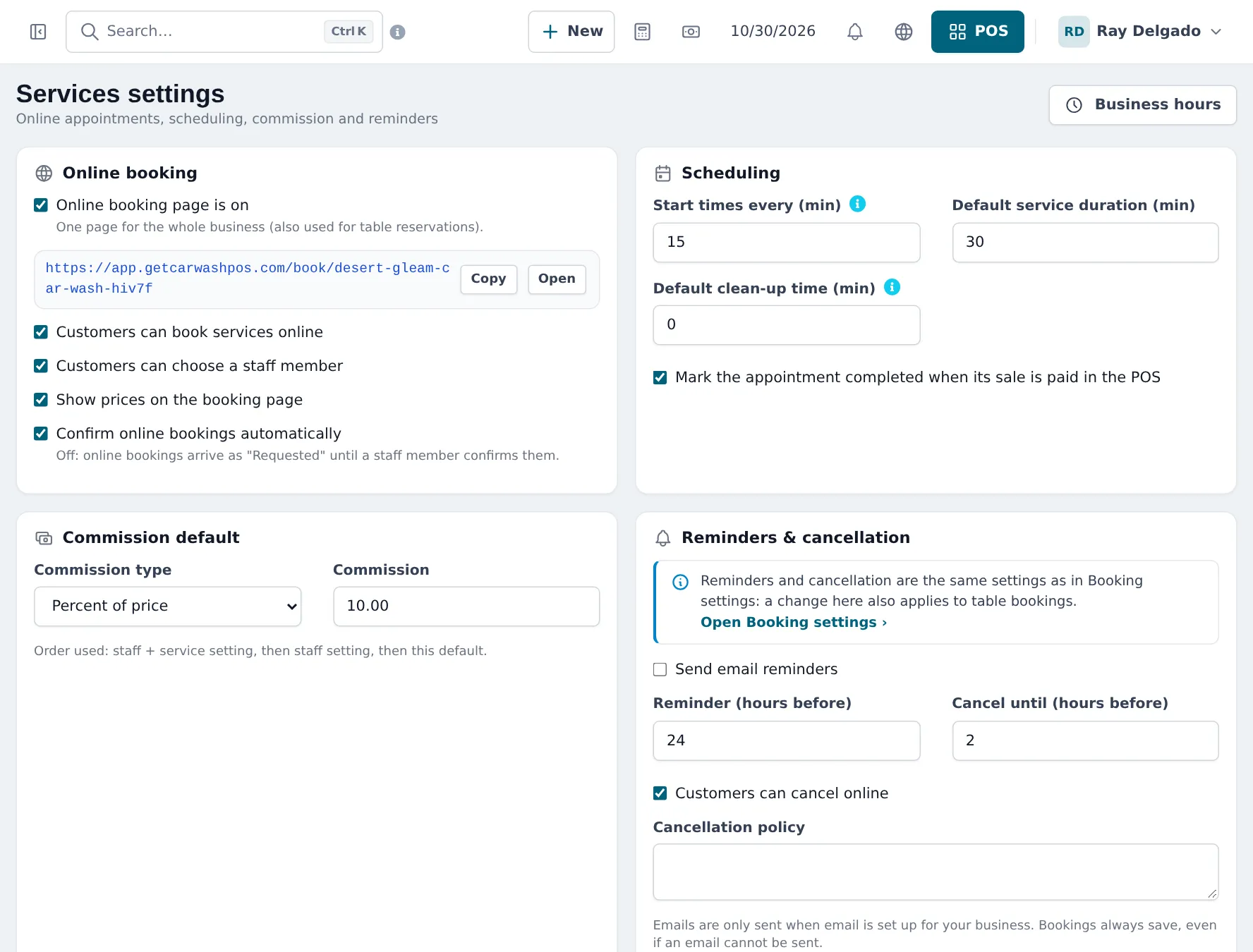
Section titled “Set hours and scheduling”- Open Services › Settings and click Business hours to set your opening hours per day.
- Under Scheduling, set Start times every (min) (for example 15), Default service duration (min) and Default clean-up time (min).
- Tick Mark the appointment completed when its sale is paid in the POS.
- Set the Commission default (used when a crew member has no own rate). Click Save.
Tips and mistakes to avoid
Section titled “Tips and mistakes to avoid”- Set opening hours before adding appointments; times outside them are not offered.
- If you only sell tunnel washes and never book, you can skip Services and Bookings and run everything on the POS.
Frequently asked questions
Which modules does a car wash need?
Services (service menu, crew, appointments, commission) and, for the calendar and walk-ins, Bookings. Service staff lets the cashier pick the crew member on a POS sale. An express-only tunnel can run on the POS alone.
Where are the module switches?
Settings › Business Settings, Modules tab. Turn the modules on and click Update settings.
Where do I set opening hours?
In Bookings › Settings (or the Business hours button in Services › Settings). Staff without their own hours use them.
Do I need a location for each wash bay?
No. A location is a site with its own address and sales. Bays are not locations; plan bays through staff and appointment times.
The Services card says Not in your plan. What now?
Your plan does not include it. Click See plans on the card, or contact support.