
Café step 6: loyalty with reward points
Reward points are SmartPOS Hub’s built-in loyalty program. Customers earn points on every purchase and spend them as a discount on a later visit. It works best when cashiers ask for the phone number on every sale.
Set up points
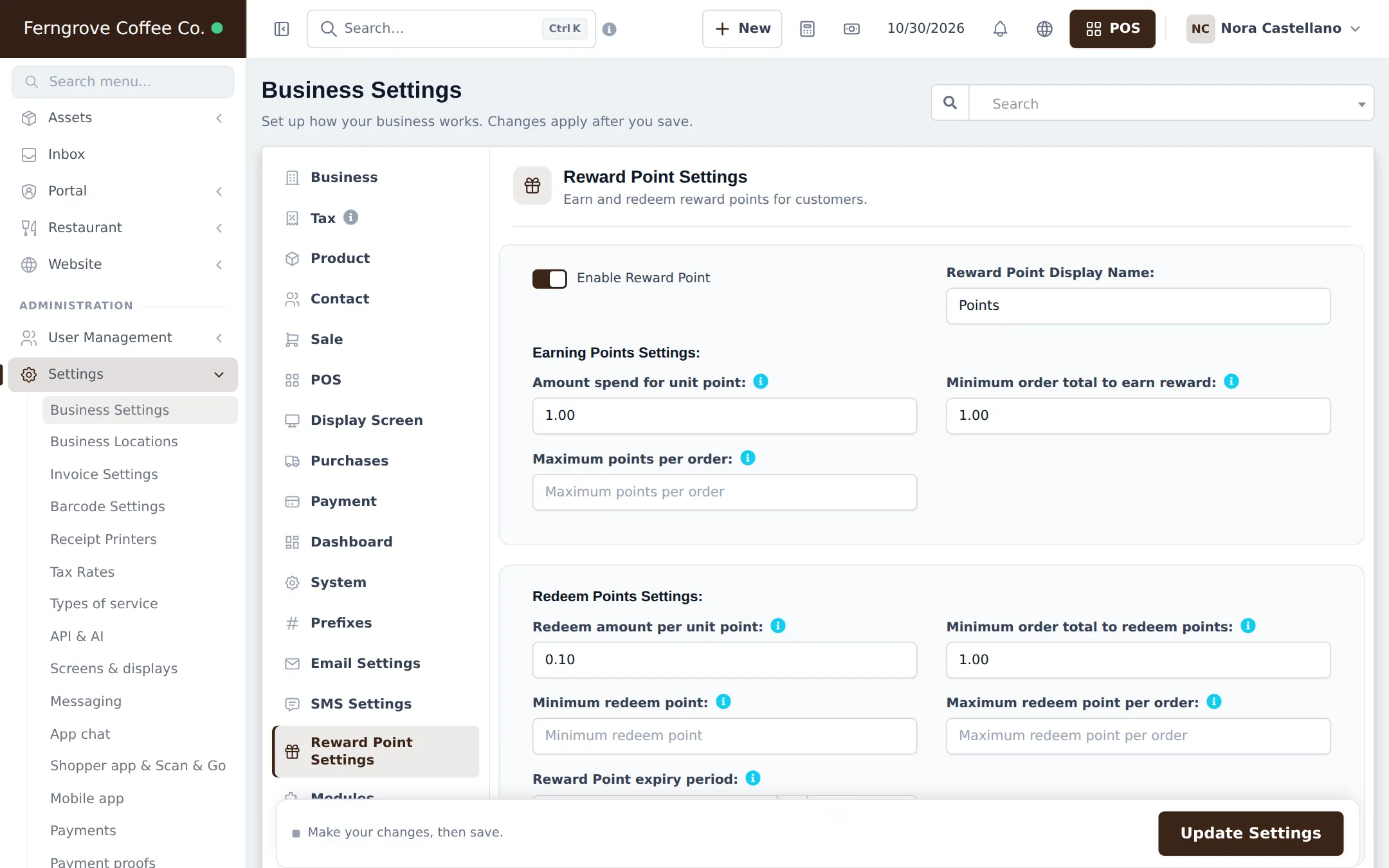
Section titled “Set up points”- Open Settings › Business Settings and click Reward Point Settings.
- Switch on Enable Reward Point and set the Reward Point Display Name (“Beans”, “Points”).
- Earning Points Settings: Amount spend for unit point, Minimum order total to earn reward and an optional Maximum points per order.
- Redeem Points Settings: Redeem amount per unit point, Minimum order total to redeem points, Minimum redeem point, Maximum redeem point per order and the Reward Point expiry period.
- Click Update Settings.
Example
Section titled “Example”With Amount spend for unit point = 1 and Redeem amount per unit point = 0.10: a guest who spends 50 earns 50 points; 50 points later take 5.00 off.
Earn and redeem at the till
Section titled “Earn and redeem at the till”- Search the customer by phone on the POS. Their available points load.
- To redeem, open the discount window, enter the points in Redeemed and click Update.
- Finish the sale. New points are added for the final amount.
Details: Reward points.
Tips and mistakes to avoid
Section titled “Tips and mistakes to avoid”- Quick-add new customers with just a name and phone at the till; it takes seconds.
- Points are earned on final sales only, not on drafts or quotations.
- Use customer groups for staff or partner discounts instead of points.
Frequently asked questions
How do I give one point per dollar?
Set Amount spend for unit point to 1. Every 1 spent earns one point. Set it to 10 for one point per 10 spent.
How much is a point worth?
Whatever you enter in Redeem amount per unit point. With 0.10, ten points take 1.00 off the bill.
Can I make points expire?
Yes. Set the Reward Point expiry period in months or years. Leave it empty if points never expire.
Does the customer need an account?
The customer needs to be picked on the sale so points can be added. Walk-in sales earn no points. Customers can see their points in the customer portal.
Can points be redeemed when the internet is down?
Yes, if Redeem reward points offline is ticked in Offline POS settings. Points downloaded with the customer are used and checked again when the sale syncs.