
Café step 3: modifiers for milk, syrups and shots
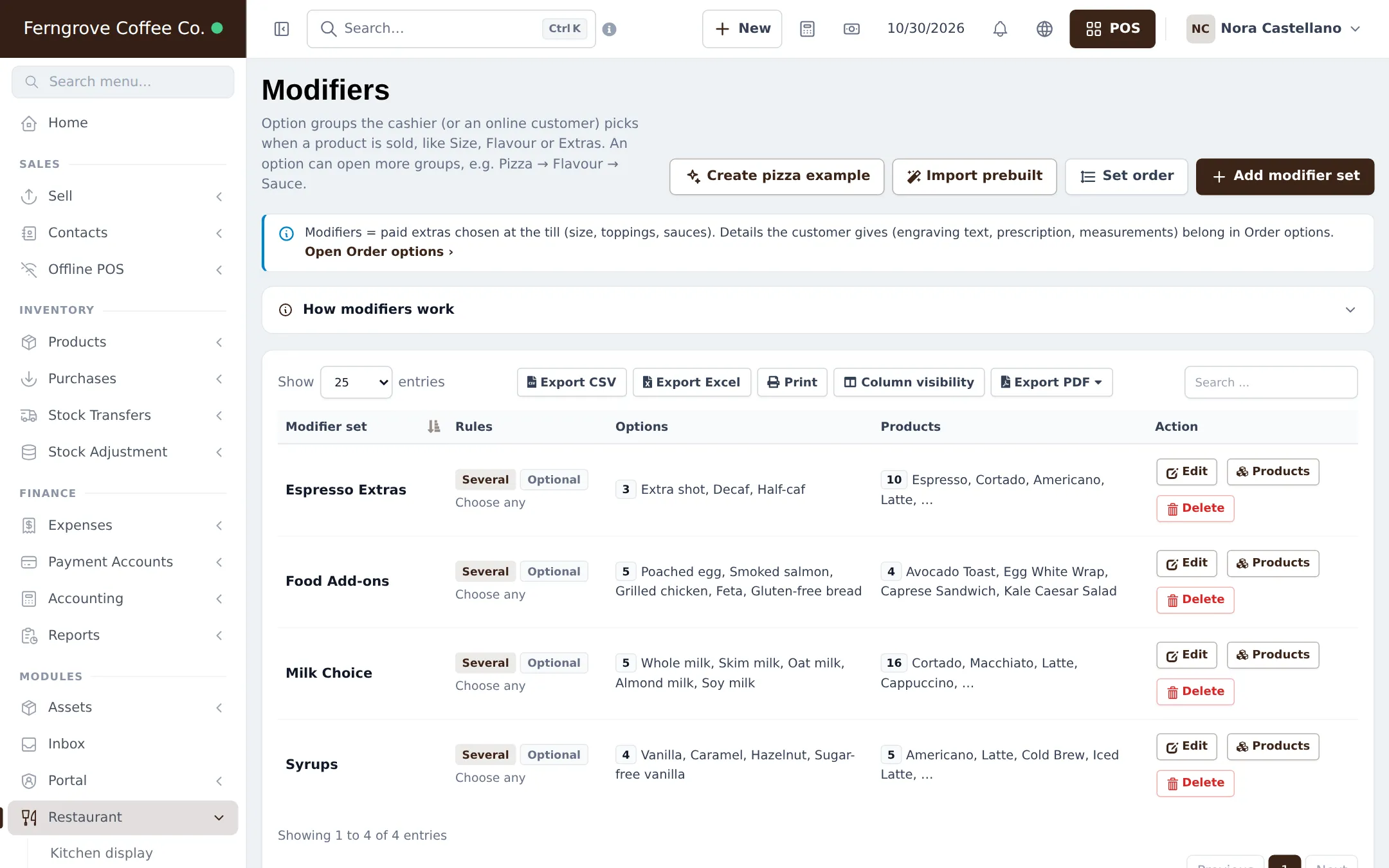
A café lives on options: oat milk, vanilla syrup, an extra shot, decaf, feta on the toast. In SmartPOS Hub these are modifier sets. Each set is one question (“Which milk?”) with options, prices and rules, linked to the drinks that ask it.
Before you start
Section titled “Before you start”- Modifiers is on (step 1) and your drinks exist (step 2).
- Your role has Add product and Edit product.
Typical café sets
Section titled “Typical café sets”| Set | Rule | Options |
|---|---|---|
| Milk Choice | One choice, optional, whole milk pre-selected | Whole, Skim, Oat (+), Almond (+), Soy (+) |
| Syrups | Several choices, first one free | Vanilla, Caramel, Hazelnut, Sugar-free vanilla |
| Espresso Extras | Several choices, quantity per option | Extra shot (+), Decaf, Half-caf |
| Food Add-ons | Several choices | Poached egg, Feta, Smoked salmon, Gluten-free bread |
Build a set
Section titled “Build a set”- Open Restaurant › Modifiers and click Add modifier set (or Import prebuilt).
- Enter the Set name and, if you like, the title shown to customers (“Choose your milk”).
- Under Selection rules, choose One choice or Several choices, Required or not, and Free choices if the first is free.
- Under Options, add each option with its price. Mark the usual one Pre-selected. For extra shots, allow a quantity per option.
- Under Products, add the drinks (or all products of the Coffee category).
- Check What the cashier sees and click Save modifier set.
Use Set order so Milk comes before Syrups on every drink. Every builder option is explained in Modifiers and Restaurant step 4.
At the counter
Section titled “At the counter”The barista taps Latte, picks 16 oz, and the options window asks the linked sets. The picks show as chips on the cart line and under the drink on the bar screen.
Tips and mistakes to avoid
Section titled “Tips and mistakes to avoid”- Make sets optional unless the drink can’t be made without the answer.
- Use one shared set per question (one Milk Choice for all drinks), not one per drink.
- Free-text requests (“extra hot”) can be typed as a note on the cart line.
Next step
Section titled “Next step”Frequently asked questions
Should oat milk be a modifier or a variation?
A modifier. Sizes change the base price and are variations; milk, syrups and shots are choices on top, so they are modifier options with their own price (0 for free).
Can whole milk be free and oat milk cost extra?
Yes. Give Whole milk a price of 0 and Oat milk its surcharge. Mark Whole milk as Pre-selected so the cashier only taps when the guest wants something else.
Can the first syrup be free?
Yes. Set Free choices to 1 on the Syrups set. The first syrup picked is free and the rest are charged.
Can a guest have two extra shots?
Yes. Switch on Allow quantity per option and set Max per option to the highest number you allow.
Do modifiers print on the bar screen?
Yes. Each picked option shows under the drink on the bar screen, the kitchen ticket and the receipt.