
Leads, newsletter subscribers and recovery carts
Leads are people who are interested but have not bought yet. SmartPOS Hub keeps them in their own list so your customer lists, POS and reports stay clean, records everything they do on a timeline, and turns them into customers the moment they buy.
Where leads come from
Section titled “Where leads come from”- Website forms and newsletter sign-ups on your online store.
- Abandoned carts online.
- SmartPOS Shopper app: a shopper who joins your store becomes a lead until their first purchase.
- Staff: Contacts › Leads › Add lead, or Import.
- Choosing Lead as the contact type in the add-contact form sends you to the Leads form with what you typed.
Work your leads
Section titled “Work your leads”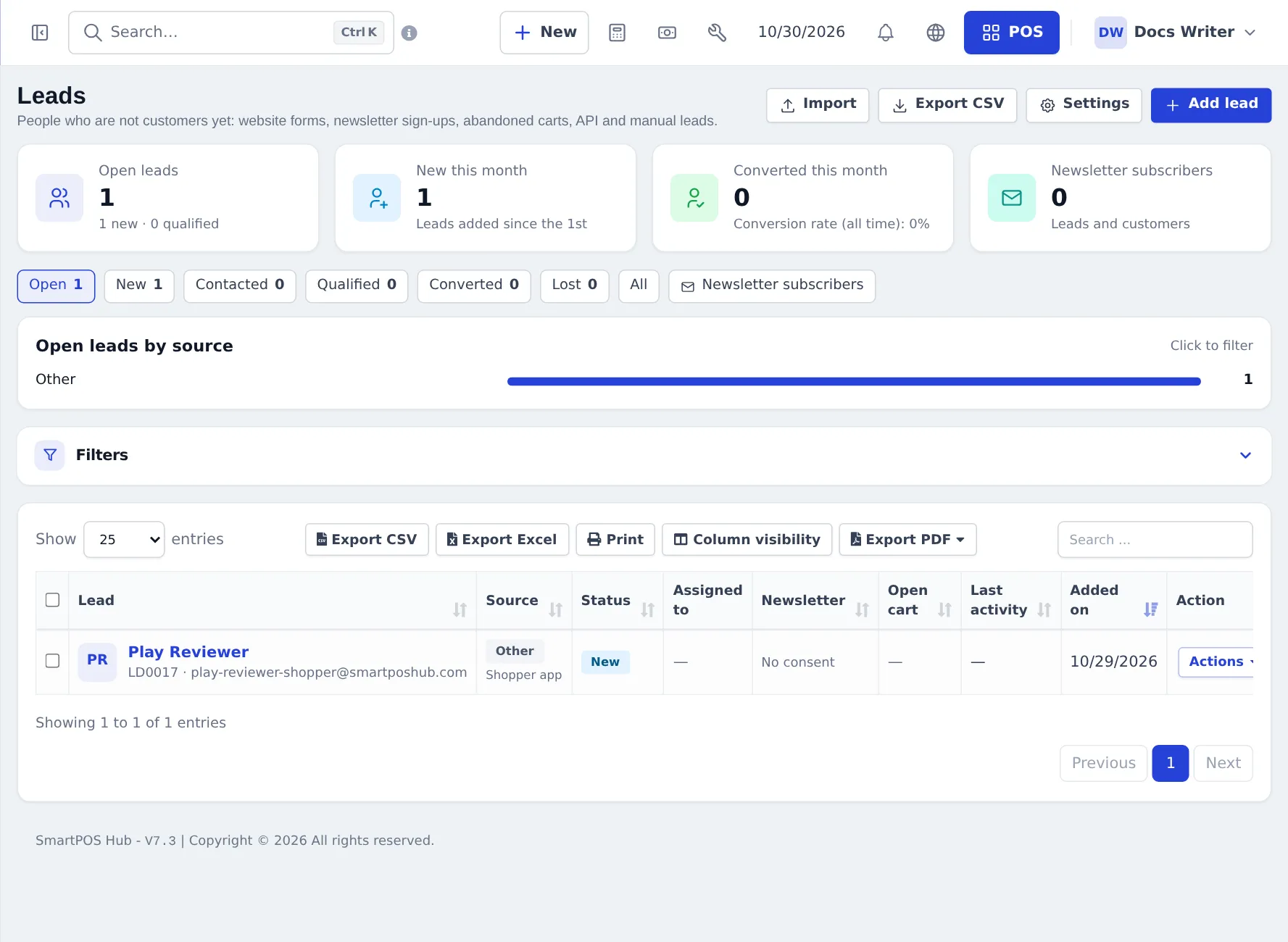
- Open Contacts › Leads. The cards show Open leads, New this month, Converted this month and Newsletter subscribers; the tabs filter by status (Open, New, Contacted, Qualified, Converted, Lost, All).
- Open a lead to see its timeline: forms, sign-ups, carts, notes, calls, e-mails, status changes.
- Assign it to a team member, change the status and log your follow-ups.
- Press Convert to customer (you only choose the customer group), or simply sell to them — the lead converts by itself.
Newsletter subscribers
Section titled “Newsletter subscribers”Any contact can be a newsletter subscriber (with the opt-in time and source). Subscribers can unsubscribe from every e-mail. Use Newsletter subscribers on the Leads page to list and export them. Marketing e-mails, including cart reminders, only go to subscribers.
Recovery carts
Section titled “Recovery carts”Contacts › Recovery carts lists online carts: open, abandoned (idle 60 minutes by default), recovered (ordered after a reminder), completed, lost and expired (after 30 days). The page shows abandoned and recovered value and the recovery rate. Per cart you can copy the recovery link, send a reminder (with consent), mark it contacted or lost, or Open in POS to finish a phone order. Automatic reminders (up to 3) are off until you switch them on in Leads › Settings.
Frequently asked questions
What is a lead?
Someone who is not a paying customer yet - a website form, a newsletter sign-up, an abandoned cart, a shopper who joined your store in the SmartPOS Shopper app, or a person you added by hand.
Why can't I find a lead in the POS?
Leads are kept apart from customers and do not show in customer lists, sales or the POS. Convert the lead, or sell to them with their store card, and they become a customer.
How does a lead become a customer?
Press Convert to customer on the lead, or it happens automatically when the person places an order - at the POS, online, in the app or as a sales order. The contact keeps its history.
Will I get duplicates?
No. Leads are matched by e-mail and mobile number. If the person is already a customer, the activity is logged on the customer instead of creating a lead.
Are cart reminder e-mails sent automatically?
Only if you switch them on in the Leads settings. They are off by default and go only to people who agreed to receive marketing e-mails.
Can a lead buy on credit?
After converting, they are an ordinary new customer. Set a credit limit on the customer if you allow credit.