
Record expenses and read the expense report
Expenses are what you spend to run the business that is not stock: rent, salaries, electricity, delivery, repairs. Recording them gives you the real net profit and keeps your cash drawer and bank balances right.
Set up categories
Section titled “Set up categories”Go to Expenses › Expense Categories and add your categories (Rent, Salaries, Utilities, Marketing…). Sub-categories are allowed. A ready set can come with your business type’s prebuilt data.
Add an expense
Section titled “Add an expense”- Open Expenses › Add Expense.
- Choose the Business Location, Expense Category, Reference No (auto if empty) and Date.
- Optional: Expense for (a staff member), Expense for contact (a supplier or other contact), tax, a document and an Expense note.
- Enter the Total amount.
- Under payment, enter what you paid now, the method and the Payment Account. Pay less or nothing to keep the rest due.
- Tick Recurring for repeating expenses, or Is refund for money returned.
- Save.
At the POS, Add Expense in the top bar records cash taken out of the drawer; it lowers the Expected Cash in Drawer when you close the register.
Pay a due expense later
Section titled “Pay a due expense later”Open Expenses › List Expenses, find the expense (its status shows Due or Partial) and use Add payment. See Credit sales and part payments — the payment window works the same way.
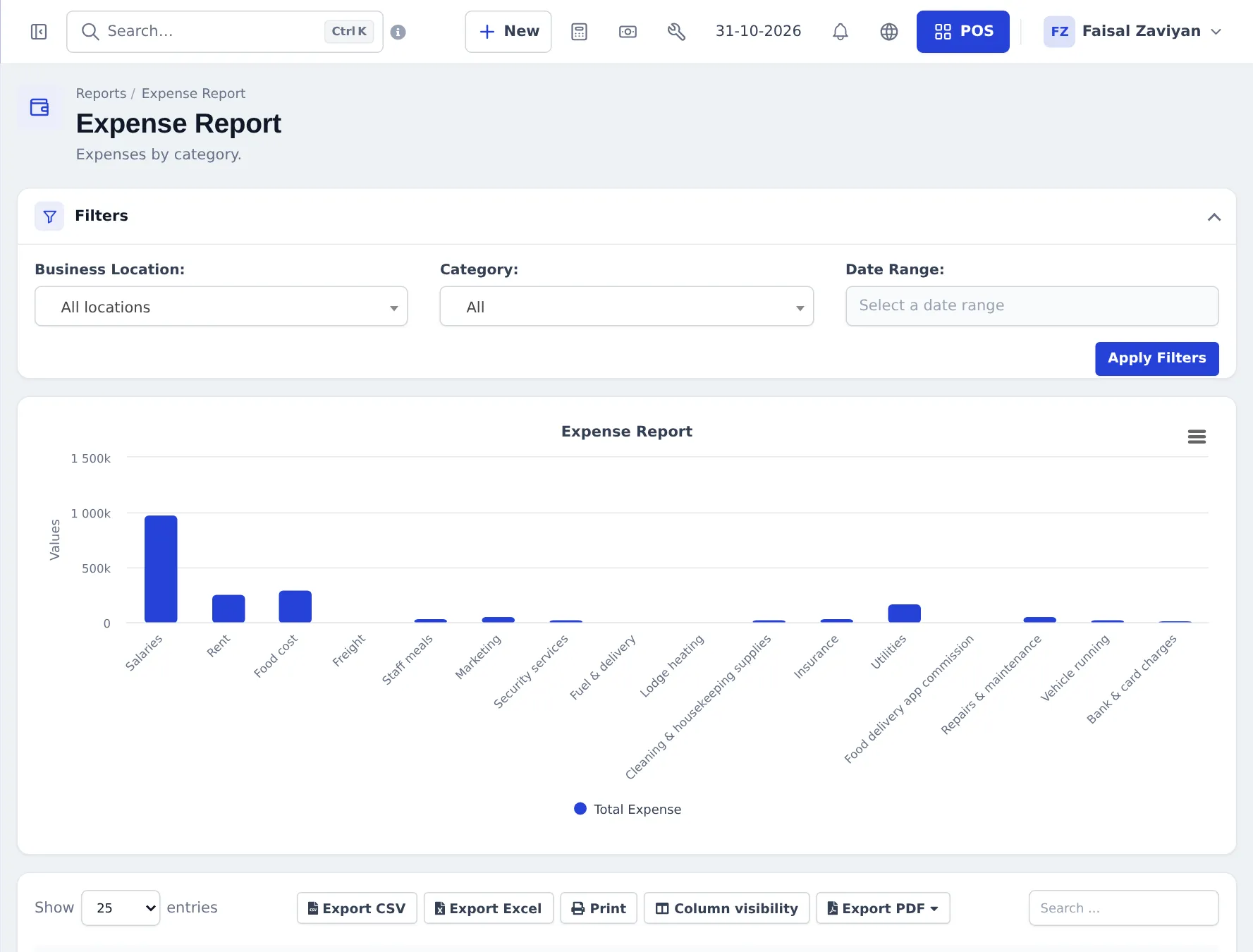
Expense Report
Section titled “Expense Report”Reports › Expense Report shows spending by category in a chart and table. Filter by Business Location, Category and Date Range, then export.
Frequently asked questions
Where do I add an expense?
Expenses › Add Expense, or the + New button in the top bar. At the POS, Add Expense in the top bar records cash paid out of the drawer.
Can I record an expense I will pay later?
Yes. Save it with no payment or a part payment. It stays due until you pay it with Add payment, just like a credit sale.
How do I set up a monthly expense like rent?
Tick Recurring on the expense and choose the interval. A new expense is created each period.
Do expenses reduce my profit?
Yes. All expenses in the period are subtracted in the Profit / Loss report to give net profit.
Can I record money coming back, like a supplier refund on an expense?
Yes. Tick Is refund on the expense; it reduces your expense total.
Can I add expenses from my phone?
Yes. The SmartPOS Business app has an Expenses screen to add and pay expenses.