
Food truck step 5: cash denominations and closing
Food trucks handle a lot of cash. Two features keep it honest: cash denominations (count notes as you take them) and the cash register (open with a float, close with a count).
Before you start
Section titled “Before you start”- Payment methods are set per truck location (Payment methods).
- Your role can change business settings (for the setup) and open and close registers (for the crew).
Set your cash denominations
Section titled “Set your cash denominations”- Open Settings › Business Settings and click the Payment tab.
- Under Cash Denominations, enter your notes and coins separated by commas (for example 1,5,10,20,50,100), or use the suggestion for your currency.
- Set Enable cash denomination on: the POS screen only, or also the sale, purchase and payment forms.
- Under Enable cash denomination for payment methods, tick Cash.
- Leave Strict check off unless every payment must match the counted notes exactly.
- Click Update Settings.
On POS V2, Quick cash buttons (Business Settings › POS › POS V2) show one-tap amounts in the payment window; empty means it uses your denominations.
Open the register at the start of service
Section titled “Open the register at the start of service”When the crew opens the POS or the app’s till for the first time in a shift, it asks for the starting cash (the float). Count it and enter it.
Close the register at the end
Section titled “Close the register at the end”- Open the register details (POS top bar, or Cash register in the app).
- Check Starting cash, Sales, Refunds, Expenses and the Expected cash, and the totals By payment method.
- Count the drawer by note, enter the counted amounts and any note, and click Close register.
- Print the Z Report (Reports › Z Report) for the truck.
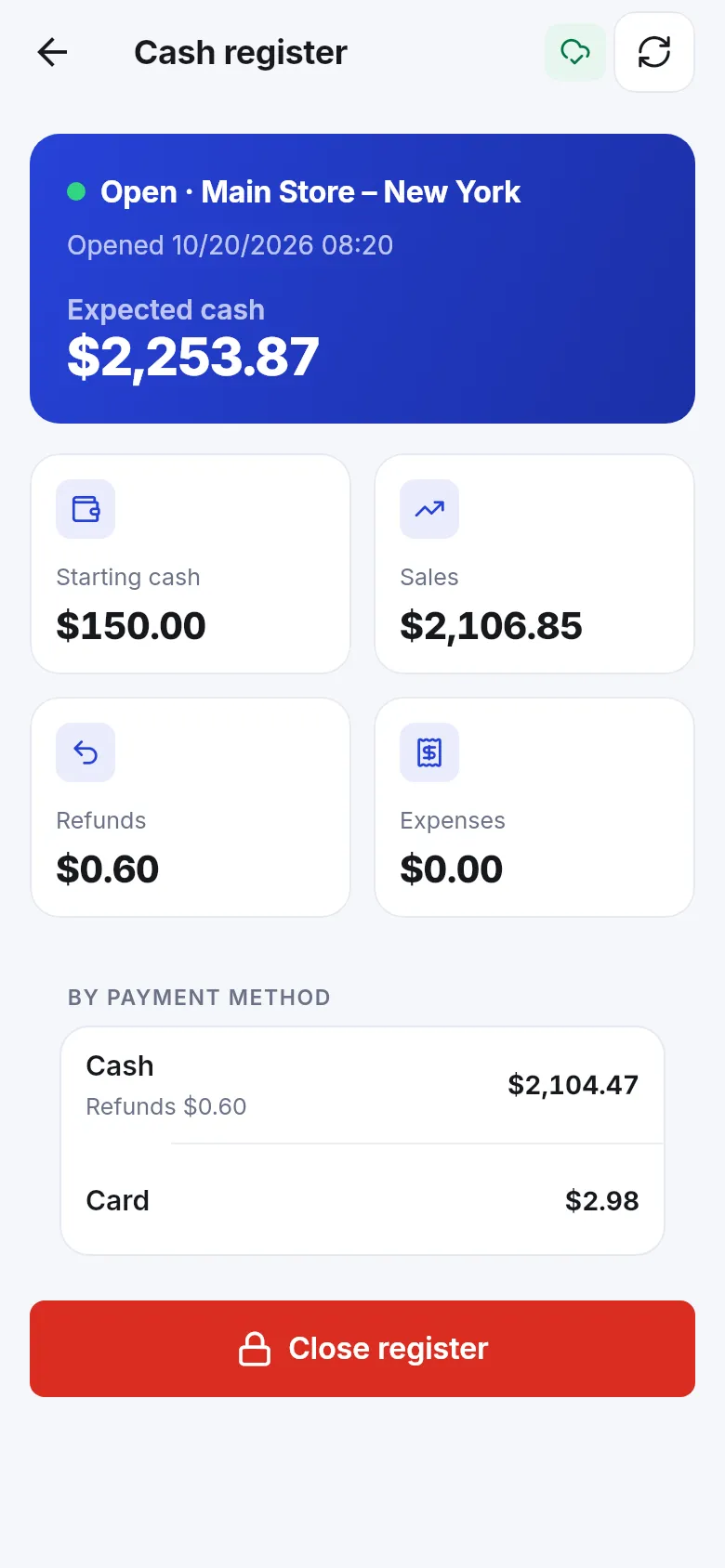
Full guide: Cash register and closing.
Tips and mistakes to avoid
Section titled “Tips and mistakes to avoid”- Record fuel or ice bought with drawer cash as an expense paid in cash, so the expected cash stays right (Expenses).
- Use the same float every day; differences are easier to spot.
- Offline sales count once they sync, so sync before you close.
Next step
Section titled “Next step”Frequently asked questions
What are cash denominations?
The notes and coins your cashiers count, for example 1, 5, 10, 20, 50, 100. When turned on, the payment window shows a counter so the cashier taps how many of each note the customer handed over.
Where do I set them?
In Settings › Business Settings, on the Payment tab, under Cash Denominations. Choose where the counter shows and for which payment methods.
What does Strict check do?
When on, a payment can't be saved unless the counted notes add up exactly to the amount entered. Leave it off at a busy window.
How do I see how much cash should be in the truck?
Open the cash register details on the POS or in the app. It shows starting cash, sales, refunds and expenses, and the expected cash by payment method.
Can each truck close separately?
Yes. Each truck has its own register and Z Report, because each truck is its own location.