
Leads & recovery carts module
The Leads & recovery carts module keeps people who are not customers yet - and the carts they left behind - in one place under Contacts. For daily use, see also Leads.
Leads (Contacts › Leads)
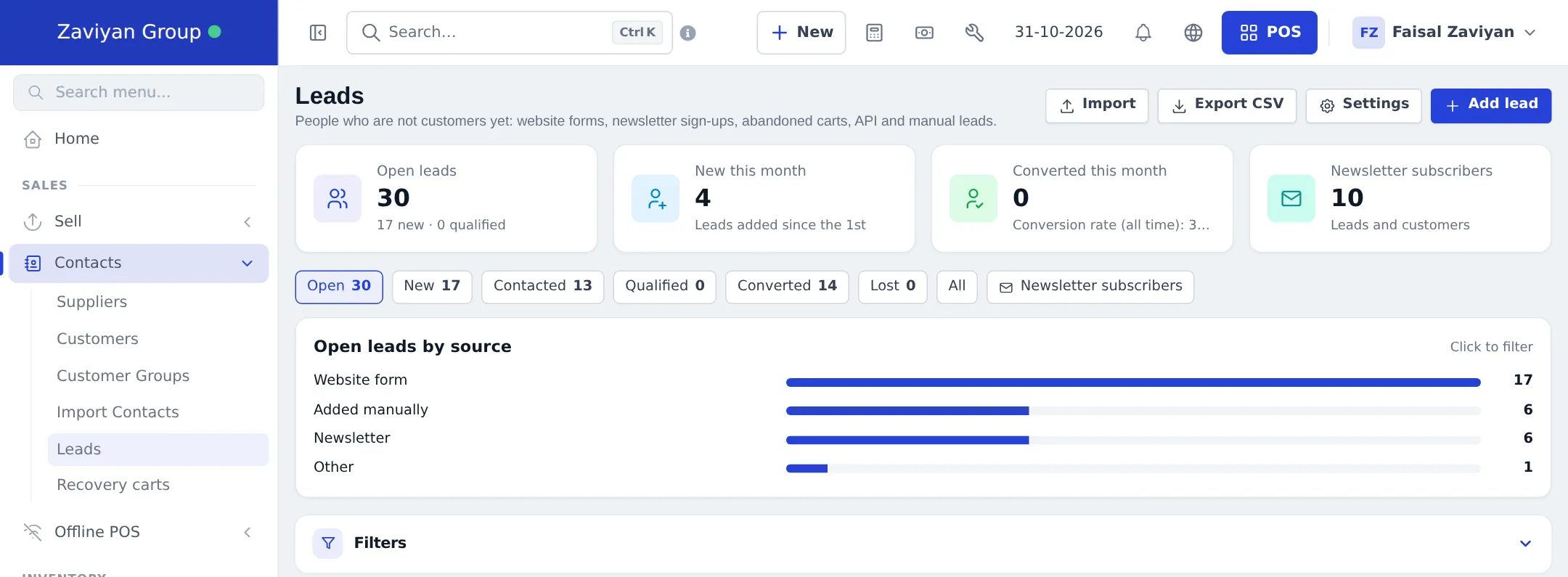
Section titled “Leads (Contacts › Leads)”- Tiles: Open leads, New this month, Converted this month with the conversion rate, Newsletter subscribers.
- Tabs: Open, New, Contacted, Qualified, Converted, Lost, All, Newsletter subscribers.
- Open leads by source (website form, added manually, newsletter, Shopper app…); click to filter.
- Each lead has a timeline: forms with their fields, newsletter, carts, reminders, notes, calls, e-mails, SMS, WhatsApp, status changes, assignment, conversion and orders.
- Import, Export CSV, Settings and Add lead.
Recovery carts (Contacts › Recovery carts)
Section titled “Recovery carts (Contacts › Recovery carts)”Carts from your online store (signed-in customers) and the API move from Open to Abandoned after the idle time, then Recovered (ordered after being abandoned), Ordered, Lost or Expired (after 30 days by default). Tiles show abandoned value, recovered value, recovery rate and open carts. Actions: copy the recovery link, send a reminder (with consent), mark contacted, mark lost, and Open in POS for a phone order.
Related pages
Section titled “Related pages”Frequently asked questions
What is a lead?
Someone who is not a paying customer yet: a website form, a newsletter sign-up, an abandoned cart, a Shopper app join, an API contact or someone staff added. Leads never appear in customer lists or the POS customer search.
How does a lead become a customer?
Automatically when they place an order (website, app, API, POS sale) or are scanned at the counter, or with Convert to customer. They keep the same record, timeline and carts.
Will I get duplicates?
No. Leads are matched by e-mail and mobile number. An existing customer always wins, and a lead is merged when staff add a customer with the same e-mail or mobile.
What is a recovery cart?
A cart from your online store or the API that was not ordered. After the idle time (60 minutes by default) it is marked abandoned, and you can copy a recovery link, send a reminder or open it in the POS.
Are cart reminders sent automatically?
Only if you switch them on (off by default): up to 3 reminders with your own delays, only to people who agreed to marketing e-mails.
Where do I find leads?
Contacts › Leads and Contacts › Recovery carts.