
Recycle Bin - restore deleted products and contacts
The Recycle Bin keeps everything you delete in SmartPOS Hub’s setup data (products, contacts, users, categories, brands, units, tax rates and more) so you can bring it back exactly as it was. Items that were never used can be deleted permanently; items with history are kept for your records. Every business has it.
What goes to the Recycle Bin
Section titled “What goes to the Recycle Bin”| Item types | Notes |
|---|---|
| Products (single, variable, combo) | Disappear from POS, lists and new documents; history stays in reports |
| Contacts | Customers and suppliers |
| Users | You can’t delete yourself or the business owner |
| Categories, Brands, Units, Tax rates, Expense categories, Selling price groups, customer groups, variations, warranties, product fields | Restoring a sub-item can bring its parent back too |
| Restaurant tables and modifier sets, hotel rooms, gym members and plans, repair job sheets and device models | When those modules are used |
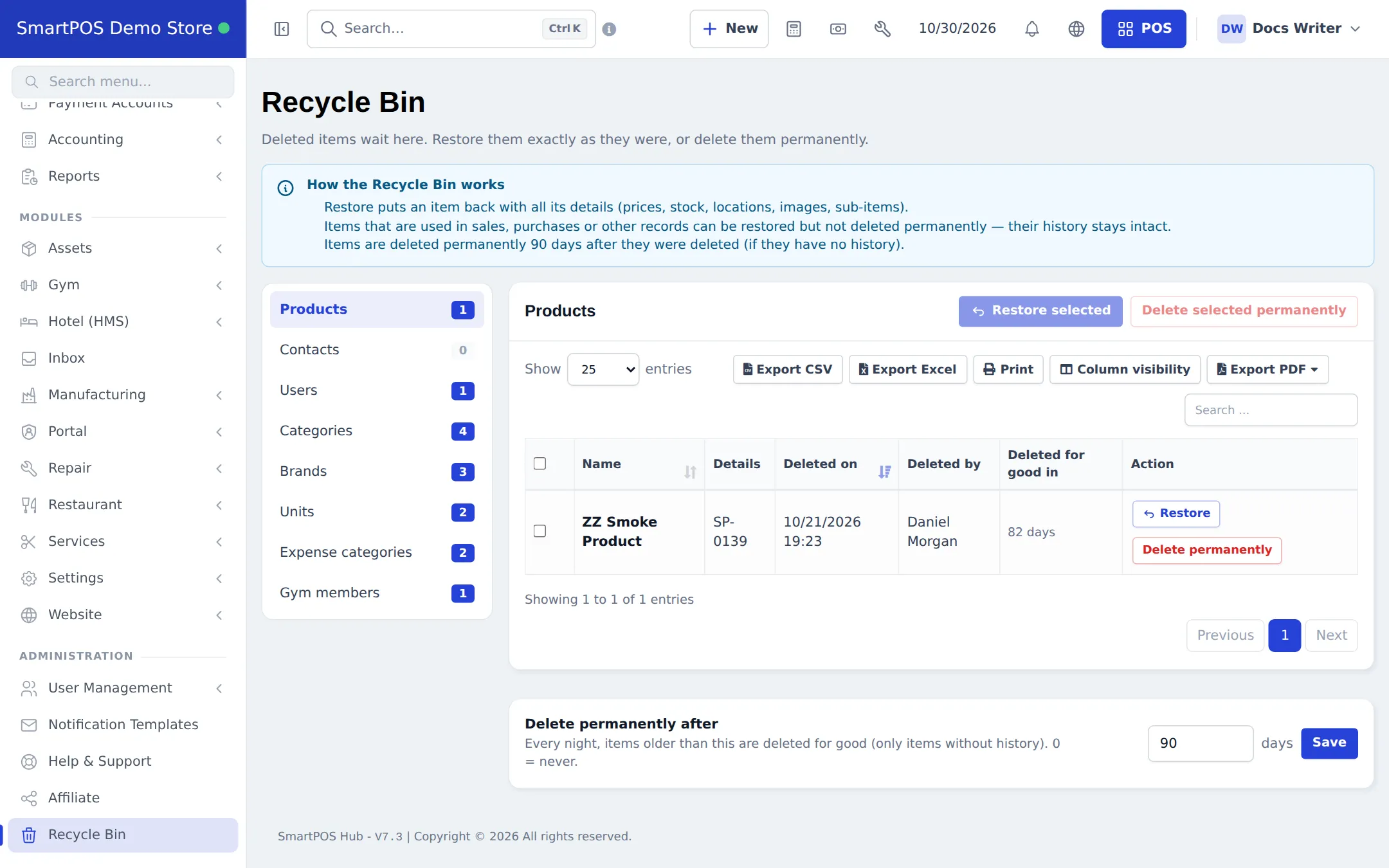
The left side of the page lists item types with counts. Products, Contacts, Users and Categories always show; other types appear when they have items.
When you delete something
Section titled “When you delete something”- Undo: right after deleting, a message “Moved to the Recycle Bin” appears with Undo and Open Recycle Bin. Undo works for 15 minutes.
- Products with sales or stock ask first: Cancel, Deactivate or Move to Recycle Bin anyway. Deactivating keeps the product but hides it from POS and new documents.
- Bulk delete of products moves only products without history and without stock; the others are skipped.
- A product that is part of a combo, or a manufacturing ingredient, can’t be deleted; deactivate it instead.
Restore an item
Section titled “Restore an item”- Open Recycle Bin in the sidebar.
- Pick the item type on the left, or search.
- Click Restore on a row, or tick several rows and click Restore selected.
- If a unique value (SKU, contact ID, username) is now used by something else, enter a new value and click Rename and restore. If a parent is also in the bin, choose Restore the parent too or Move to top level.
Delete permanently
Section titled “Delete permanently”- Click Delete permanently on a row, or tick rows and click Delete selected permanently.
- Type the item’s name (or the number of items) to confirm. This can’t be undone.
- Items that are still used in other records are kept and show Kept — has history.
Settings
Section titled “Settings”At the bottom of the page, Delete permanently after sets how many days items wait before the nightly clean-up deletes them for good (only items without history). 0 means never. Only users with the permanent-delete permission can change it.
Permissions
Section titled “Permissions”| Permission (as on the Roles page) | Lets the user |
|---|---|
| View Recycle Bin | Open the page and see deleted items |
| Restore deleted items | Restore single or several items |
| Delete items permanently (and set the clean-up period) | Delete for good and change Delete permanently after |
Other roles get none of these until you tick them. Restoring hotel items also needs the hotel settings permission.
Related pages
Section titled “Related pages”Frequently asked questions
I deleted a product by mistake. Is it gone?
No. It moved to the Recycle Bin. Click Undo on the message that appears right after deleting, or open Recycle Bin, find the product and click Restore. It comes back with its prices, stock, locations and images.
How long do deleted items stay in the Recycle Bin?
90 days by default. Every night, items older than the period you set under Delete permanently after are deleted for good, but only if they have no history. Set it to 0 to keep items until you delete them yourself.
Why can't I delete an item permanently?
It is used in sales, purchases or other records, so it is kept for history and shows Kept — has history. You can still restore it.
Can I restore a product whose SKU is now used by another product?
Yes. The Recycle Bin asks for a new SKU and suggests one, then restores the product with it.
Are deleted sales and purchases in the Recycle Bin?
No. Sales, purchases, returns, expenses, payments, transfers and stock adjustments keep their own delete rules and are not listed. The Recycle Bin is for setup data such as products, contacts, users and categories.
Does a deleted product with stock still count in my stock report?
Its stock stays recorded but is hidden from the stock report until you restore the product. Its past sales and purchases stay in all reports.