
Bottle shop step 3: age-restricted sales
Selling alcohol means checking age. SmartPOS Hub supports this in two places: at the till, with an order options form that asks for the date of birth and an ID confirmation, and online and in Scan & Go, with the Age restricted switch on each product.
At the till: the Age-restricted sale form
Section titled “At the till: the Age-restricted sale form”- Switch on Order options & personalisation in Settings › Business Settings › Modules.
- Open Products › Order options and click Import prebuilt.
- Choose the trade Liquor & beverages, tick Age-restricted sale (click Details to see its 2 fields) and click Import selected.
- For a 21+ country, import the ready-made group Age check (21+) on the Field groups tab, then open the form on the Forms tab and use it instead of Age check (18+).
- Open Where they apply, click Attach to products and choose your alcohol categories (Wine, Spirits, Beer & Cider) and all locations.
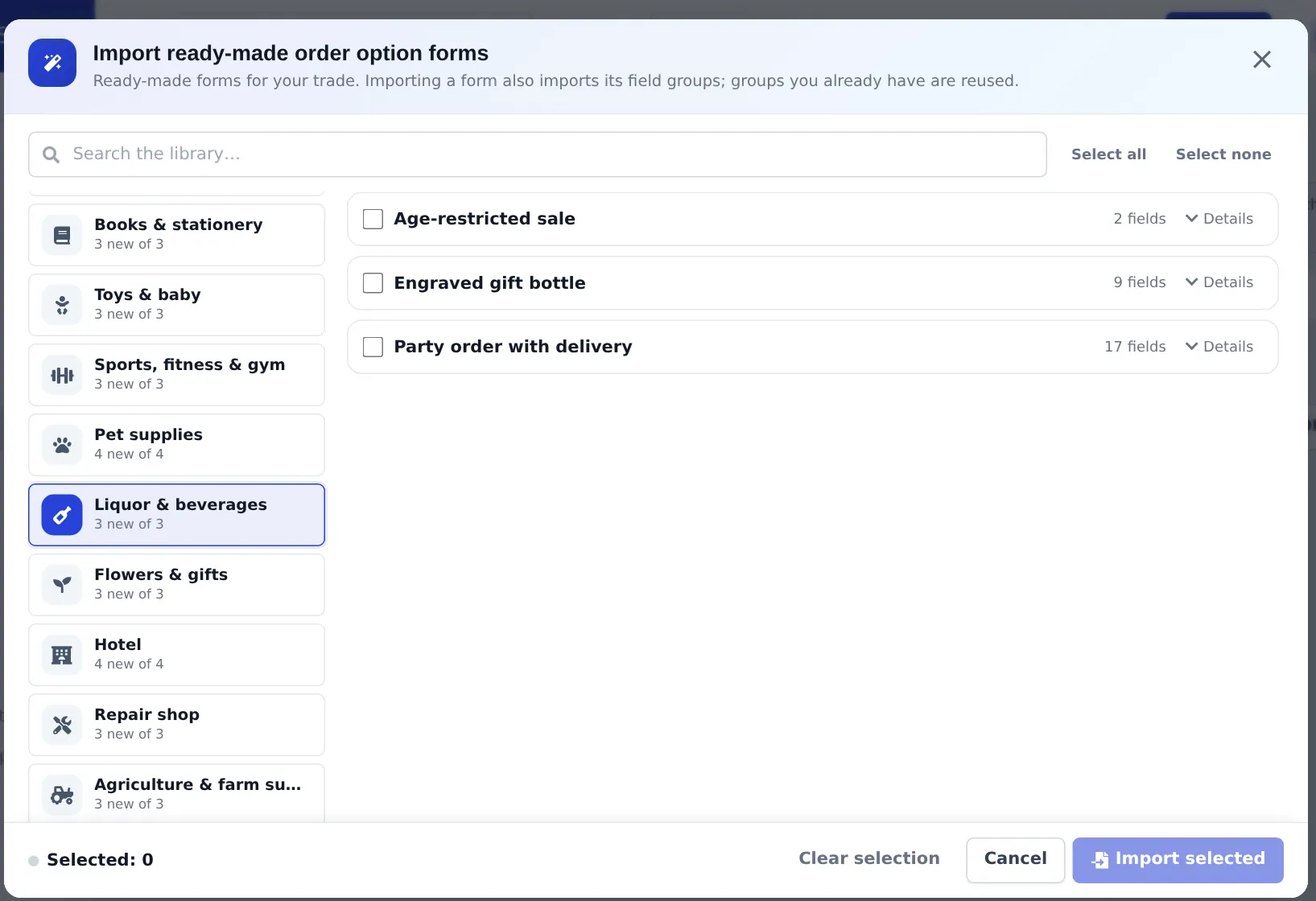
From now on, when an alcohol product is added in POS V1, POS V2, Add Sale or the Business app:
- The order options window opens with Date of birth and ID checked.
- A date of birth under the minimum age is rejected.
- The cashier ticks I have checked the customer’s photo ID. and clicks Save details.
Each alcohol line asks for the check, so the record stays with every bottle sold.
Online and Scan & Go: the Age restricted switch
Section titled “Online and Scan & Go: the Age restricted switch”- Open the product (Products › List Products › Edit) and go to the Online store tab.
- Open Advanced and, under Restrictions & customs, switch on Age restricted.
- Set Minimum age (18 by default; 21 in the US).
- Save.
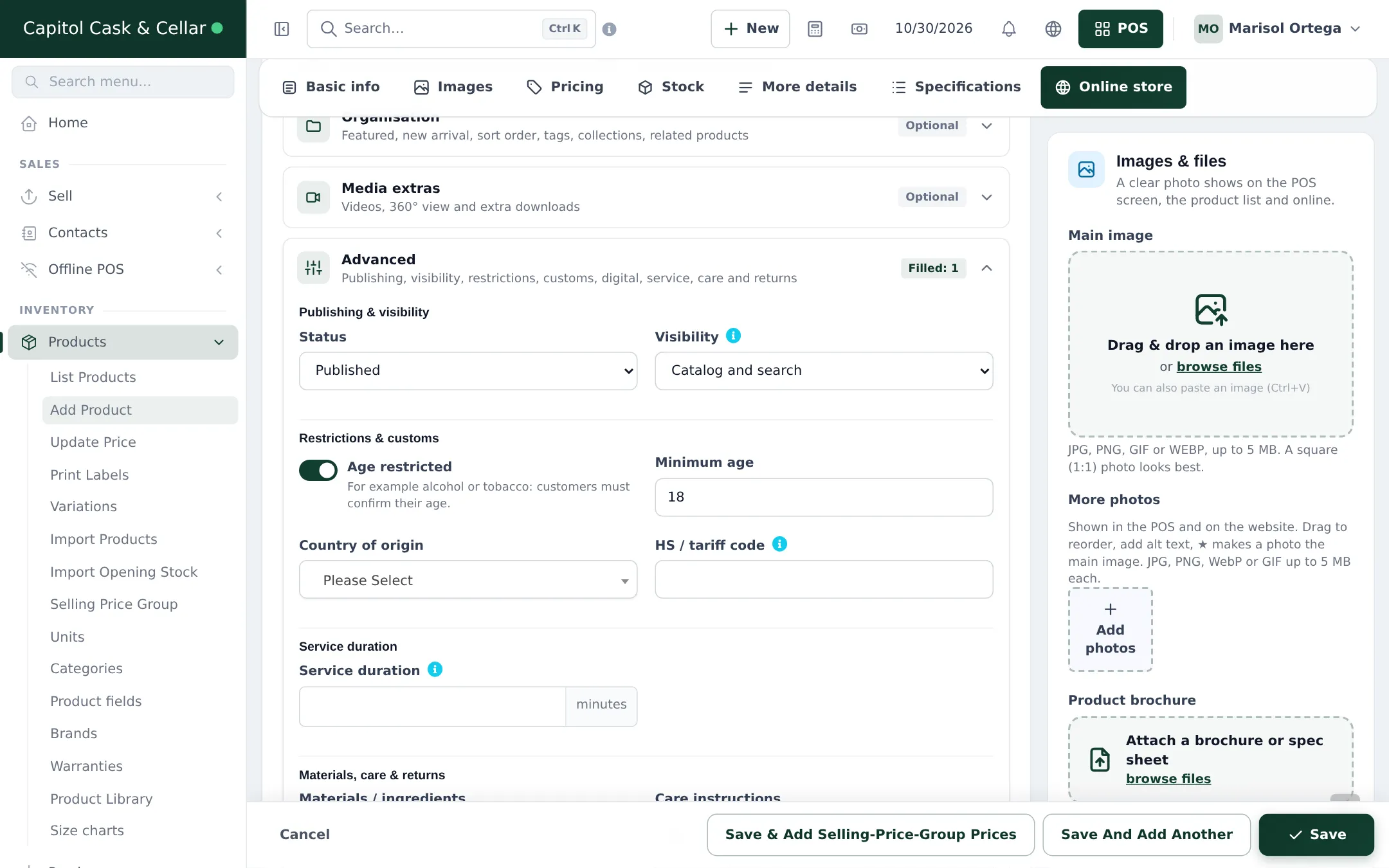
- Website: customers confirm their age before they can check out an order with the product.
- Scan & Go: when the cashier loads a shopper’s cart code, lines with the product carry a check-ID note.
Tips and mistakes to avoid
Section titled “Tips and mistakes to avoid”- Set the switch on every alcohol product; it is per product, not per category. Do it while you load the catalog so none are missed.
- Train staff that the form records the check but the decision to refuse is theirs.
- Delivery orders: the Party order with delivery form includes the age check; drivers should check ID on delivery too.
Frequently asked questions
Does the POS check age automatically?
Not without setup. Attach the Age-restricted sale order options form to your alcohol categories. The till then asks for the date of birth, rejects a date under the minimum age, and the cashier must tick I have checked the customer's photo ID.
The ready-made form checks 18+. We need 21+.
Import the ready-made field group Age check (21+) on the Field groups tab (it is offered for the Liquor & beverages trade), then open the form and use it instead of Age check (18+).
Is the date of birth printed on the receipt?
No. The date of birth is marked sensitive and prints only on the work ticket, not on the invoice. Only staff with the sensitive-profiles permission can see saved values.
What does Age restricted on the product do?
It is on the product's Online store tab. Online customers must confirm their age before ordering, and Scan & Go carts with the product show a check-ID note when the cashier loads them.
Can a cashier skip the check?
Required fields block a final sale while they are empty. A cashier without the Fill in and edit order options on sales permission sees Details to add and the line is marked Details missing for a colleague.
Do I have to check every customer?
That depends on your local rules. Many stores check everyone who looks under 30 or 40; the form records that the check was made.